V6 — Universal AI · Hook Rewriter · Multi-language

Turn 1 Long Video into
10 Viral Shorts in Seconds

The blazing-fast Windows desktop app that uses AI to find viral moments, remove silence, generate captions — and export dozens of clips at once. Runs 100% on your machine. Your videos never leave your PC.

Stop Paying $20–$100/month — Clippie replaces it all

Opus Clip, Submagic, CapCut Pro… $30–$100/mo
Clippie (one-time) $39.99 total
100% private & offline No cloud subscriptions 12k+ downloads
Clippie V6 | AI Video Automation
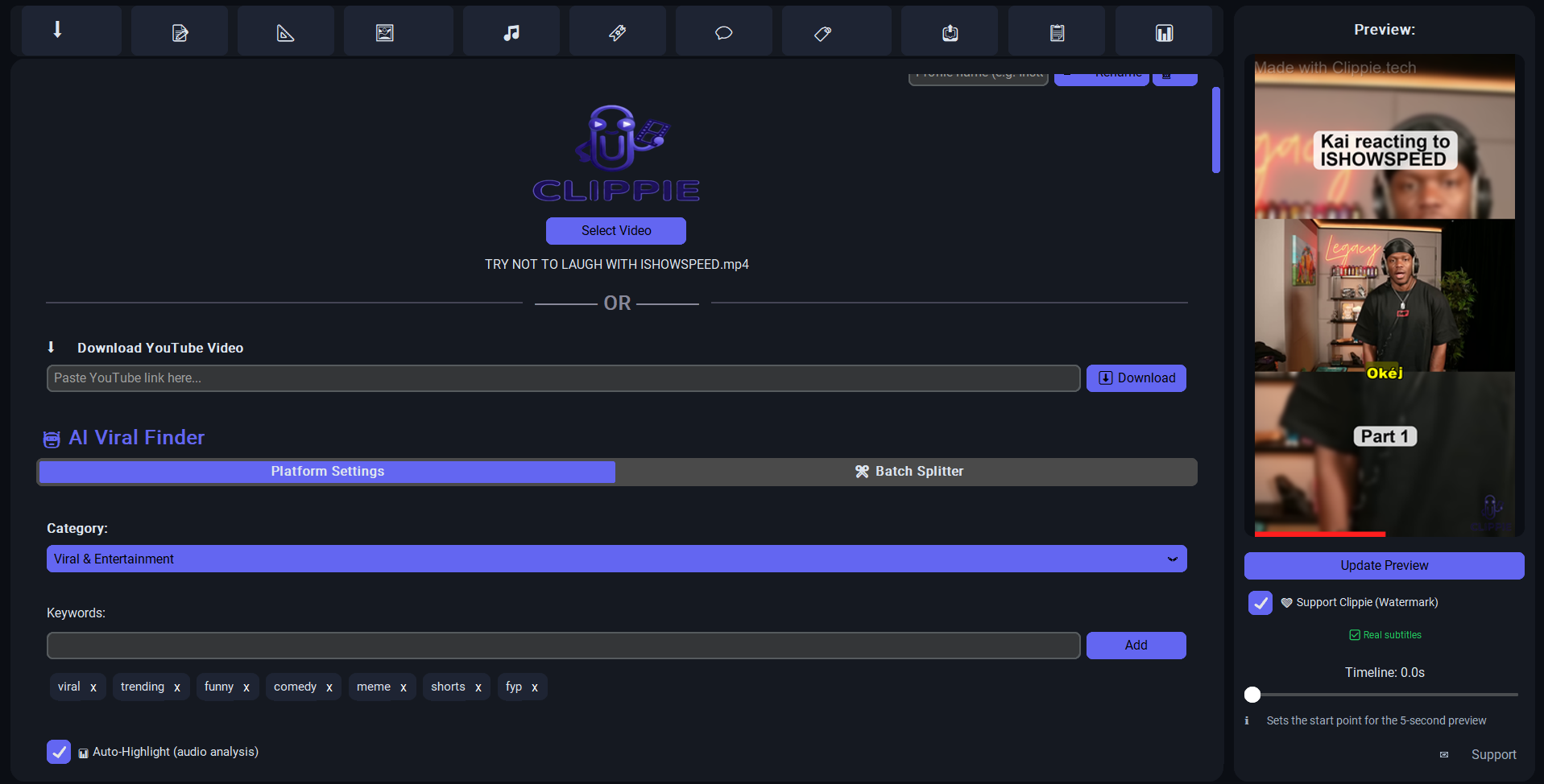
Clippie V6 desktop app interface — AI video automation tool for Windows showing clip editor, Universal AI Provider and viral moment finder

Trusted by creators on

12.000+

Downloads

4,9/5

Avg. Rating

$3.600+

Saved per user / year

Core Features

Everything You Need to
Go Viral

19 powerful tools, one app. Scroll or drag to explore.

scroll · drag · touch
Your Data, Your Rules

100% Private. Zero Cloud.

Unlike every other AI video tool, Clippie runs entirely on your own computer. No uploads, no cloud servers, no third-party access. Your content stays on your hard drive — period.

Runs on YOUR PC

All AI processing happens locally with Whisper. Your video files, transcripts, and generated clips never touch an external server. Not ours, not anyone's.

No Company Sees Your Data

Cloud-based tools upload your raw videos to their servers — where they can be stored, analyzed, or used for training. With Clippie? Zero external access. Your content is yours alone.

Works 100% offline

Clippie is a standalone Windows Desktop App. No cloud uploading, no account required, and no data leaks. Your video files and transcripts never leave your computer.

Workflow

Three Steps. Dozens of Clips.

From a 30-minute podcast to 20 ready-to-post shorts — in under two minutes. All processing happens right here on your PC.

01

Paste a Link or Upload Your Video

Drop a local file or paste any YouTube URL — Clippie downloads and processes it instantly, right on your machine. Nothing is uploaded anywhere. Ever.

02

Choose Your Style & Language

Pick a layout (Classic, Blur, or Splitscreen), set your clip length, and choose a subtitle language. Clippie auto-translates, detects viral moments, and removes silence — no manual work required.

03

Export & Download Your Clips

Hit Start and get perfectly formatted, captioned shorts saved straight to your drive. Ready to post on TikTok, Reels, Shorts, or X — no re-encoding, no waiting, no cloud.

Optimized presets for

TikTok
Reels
Shorts
Facebook

Every platform has different aspect ratios, safe zones, and caption styles. Clippie ships with built-in presets that auto-configure crop, layout, and format per platform — so your shorts always look native.

Creators Love It

Don't Take Our Word for It

"Clippie turned a 45-min podcast into 23 TikToks in under a minute. I used to spend an entire Sunday doing this manually. Absolute game-changer."

JM

Jake Mitchell

YouTube · 240K subs

"The silence remover alone is worth it. My videos feel so much more professional now — tighter pacing, better retention. And it runs completely offline!"

SR

Sarah Rivera

TikTok · 510K followers

"I cancelled my $30/mo cloud editor subscription the day I found Clippie. Faster, no watermarks, no upload wait times. Local AI just hits different."

DK

David Kim

IG Reels · 89K followers

"As someone who covers sensitive political topics, privacy matters. Knowing that my unedited footage never touches a cloud server gives me real peace of mind. Clippie is the only tool I trust."

MH

Maria Herrera

YouTube · 175K subs

"I was paying $49/month for Opus Clip + $15 for a captioning tool. Clippie does both for a one-time fee. It literally paid for itself on day one. The batch export is insanely fast too."

TP

Tyler Park

TikTok · 320K followers

"The auto-captions with CapCut-style word highlight look incredible. I've tried 5 other tools and Clippie's output is by far the cleanest. Plus no monthly bill — love it."

AS

Aisha Singh

YouTube Shorts · 95K subs

Get Started

Start Clipping. One-Time Payment.

Pay once, own it forever. No account needed, no cloud dependency, no recurring fees. Just download, open, and create.

Clippie Logo

Clippie V6

Windows Desktop App

$39.99

One-time payment · Lifetime license

  • AI Viral Finder — audio peak & engagement detection
  • Faster-Whisper transcription — up to 4× faster than standard
  • Smart Silence Remover — 60 FPS, zero quality loss
  • Auto-captions with CapCut-style word highlights
  • 12-language subtitle translation — no API key needed
  • YouTube downloader built-in — paste URL, done
  • 3 layout styles — Classic, Blur Background, Splitscreen
  • Universal AI Provider — ChatGPT, Claude, Gemini, Ollama
  • 100% private & offline — zero cloud, zero uploads
  • Lifetime updates included — one payment, forever
Buy Now — $39.99

Windows 10/11 · 64-bit · ~120 MB

Support

We're Here to Help

Got a question, found a bug, or want to share feedback? We respond fast and take every message seriously.

Common Questions

Does Clippie work without internet?

Yes — 100% offline. Transcription, clipping and export all happen locally. An internet connection is only needed to download YouTube videos.

Which languages are supported for subtitles?

Clippie supports 12 languages out of the box: English, Dutch, German, French, Spanish, Portuguese, Arabic, Chinese, Japanese, Hindi, Italian, and Turkish.

Do I need a GPU?

No — Clippie runs on any modern Windows 10/11 PC. A GPU speeds things up, but the faster-whisper engine is optimized to be fast even on CPU-only machines.

Download Clippie V6  ·  $39.99